# Netrunner 19.01 Desktop grub2
**URL:** https://support.blue-systems.com/t/netrunner-19-01-desktop-grub2/4604
**Category:** Netrunner 19.01
**Created:** [February 5, 2019, 7:33pm UTC](https://support.blue-systems.com/t/netrunner-19-01-desktop-grub2/4604 "2019-02-05T19:33:18Z")
**Posts on this page:** 6
**Page:** 1
### Author:  [@heliosstyx](https://support.blue-systems.com/u/heliosstyx)
#### Post date: [February 5, 2019, 7:33pm UTC](https://support.blue-systems.com/t/netrunner-19-01-desktop-grub2/4604/1 "2019-02-05T19:33:18Z")
I enabled continuous update and during the update process there was a new grub2-version available: the update process stopped and asked for four options to install the new grub2 version: 1. trust the package maintainer etc… What should be selected? I take the option trust the package maintainer and afterwards the process continued and then you will be asked where to install the grub2, which choice now? I took nothing (let it as it is). Why does not the update process runs not full automatically? What choices should be taken? Can I reinstall the newest grub2 version again?
---
### Author:  [@leszek](https://support.blue-systems.com/u/leszek)
#### Post date: [February 5, 2019, 9:02pm UTC](https://support.blue-systems.com/t/netrunner-19-01-desktop-grub2/4604/2 "2019-02-05T21:02:55Z")
This is how the debconf and Debian way of doing things when a new configuration file in the package might overwrite a configuration file changed on disk.
When it asks you by default you can leave everything as is. (It should mark the default options for you) and just hit enter.
---
### Author:  [@heliosstyx](https://support.blue-systems.com/u/heliosstyx)
#### Post date: [February 6, 2019, 10:21am UTC](https://support.blue-systems.com/t/netrunner-19-01-desktop-grub2/4604/3 "2019-02-06T10:21:13Z")
Okay thank you. This questions for grub2 occurs only with your recommended synaptic-package-method and not when I am doing it with Discovery.
---
### Author:  [@heliosstyx](https://support.blue-systems.com/u/heliosstyx)
#### Post date: [February 6, 2019, 4:56pm UTC](https://support.blue-systems.com/t/netrunner-19-01-desktop-grub2/4604/4 "2019-02-06T16:56:40Z")
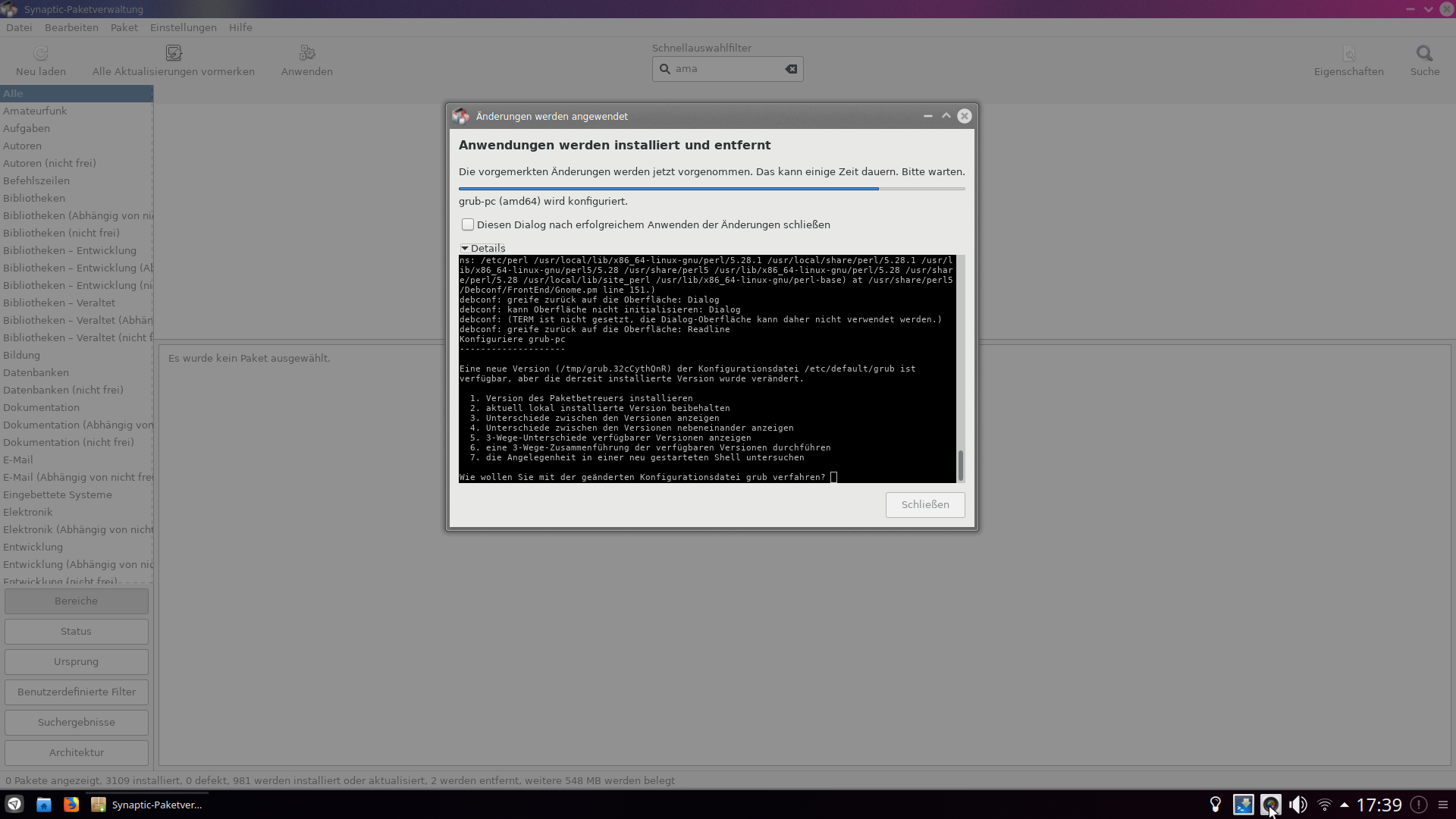 
Please look at the above screenshots. Hitting Enter does not help.
---
### Author:  [@leszek](https://support.blue-systems.com/u/leszek)
#### Post date: [February 6, 2019, 6:43pm UTC](https://support.blue-systems.com/t/netrunner-19-01-desktop-grub2/4604/5 "2019-02-06T18:43:57Z")
That is indeed a bit uncomfortable.
We by default recommend using the mintupdate tool. This should not produce such a dialog.
Also running via the terminal like
`sudo apt update && sudo apt upgrade`
should perform better by providing a more comfortable CLI like user interface.
---
### Author:  [@heliosstyx](https://support.blue-systems.com/u/heliosstyx)
#### Post date: [February 6, 2019, 7:00pm UTC](https://support.blue-systems.com/t/netrunner-19-01-desktop-grub2/4604/6 "2019-02-06T19:00:38Z")
Thank you. I will use the Mint update tool. It’s solved now.