# Start job for TLP hang up
**URL:** https://support.blue-systems.com/t/start-job-for-tlp-hang-up/4918
**Category:** Rolling 2018.08
**Created:** [September 29, 2019, 1:44pm UTC](https://support.blue-systems.com/t/start-job-for-tlp-hang-up/4918 "2019-09-29T13:44:01Z")
**Posts on this page:** 20
**Page:** 1
### Author:  [@rgif](https://support.blue-systems.com/u/rgif)
#### Post date: [September 29, 2019, 1:44pm UTC](https://support.blue-systems.com/t/start-job-for-tlp-hang-up/4918/1 "2019-09-29T13:44:01Z")
I was excited to try the Rollin release on my new thinkpad E595 since I’ve had such a good experience with the Debian edition. However, I can’t even boot the live USB. The line that it’s stuck on is " waiting for TLP to start/stop job . Any ideas how to make it run or skip the tlp step until after install when I can tweak it more ?
---
### Author:  [@AJSlye](https://support.blue-systems.com/u/AJSlye)
#### Post date: [September 29, 2019, 4:13pm UTC](https://support.blue-systems.com/t/start-job-for-tlp-hang-up/4918/2 "2019-09-29T16:13:47Z")
You might need to use some kernel parameters.
Have a look here:
[https://wiki.archlinux.org/index.php/Laptop/Lenovo#E\_series](https://wiki.archlinux.org/index.php/Laptop/Lenovo#E_series)
If that doesn’t help, look through some of these for an answer.
[https://forum.manjaro.org/search?q=Stop%20job%20for%20tlp](https://forum.manjaro.org/search?q=Stop%20job%20for%20tlp)
Other than that:
1: Compare your ISO to the checksum
2: Make sure you burned your ISO using the correct raw write style tools, like dd or suse studio, and not unetbootin or anything similar.
---
### Author:  [@rgif](https://support.blue-systems.com/u/rgif)
#### Post date: [September 29, 2019, 6:12pm UTC](https://support.blue-systems.com/t/start-job-for-tlp-hang-up/4918/3 "2019-09-29T18:12:23Z")
I haven’t find a solution in either of those. I did burn the iso with dd as well.
---
### Author:  [@rgif](https://support.blue-systems.com/u/rgif)
#### Post date: [September 29, 2019, 10:22pm UTC](https://support.blue-systems.com/t/start-job-for-tlp-hang-up/4918/4 "2019-09-29T22:22:19Z")
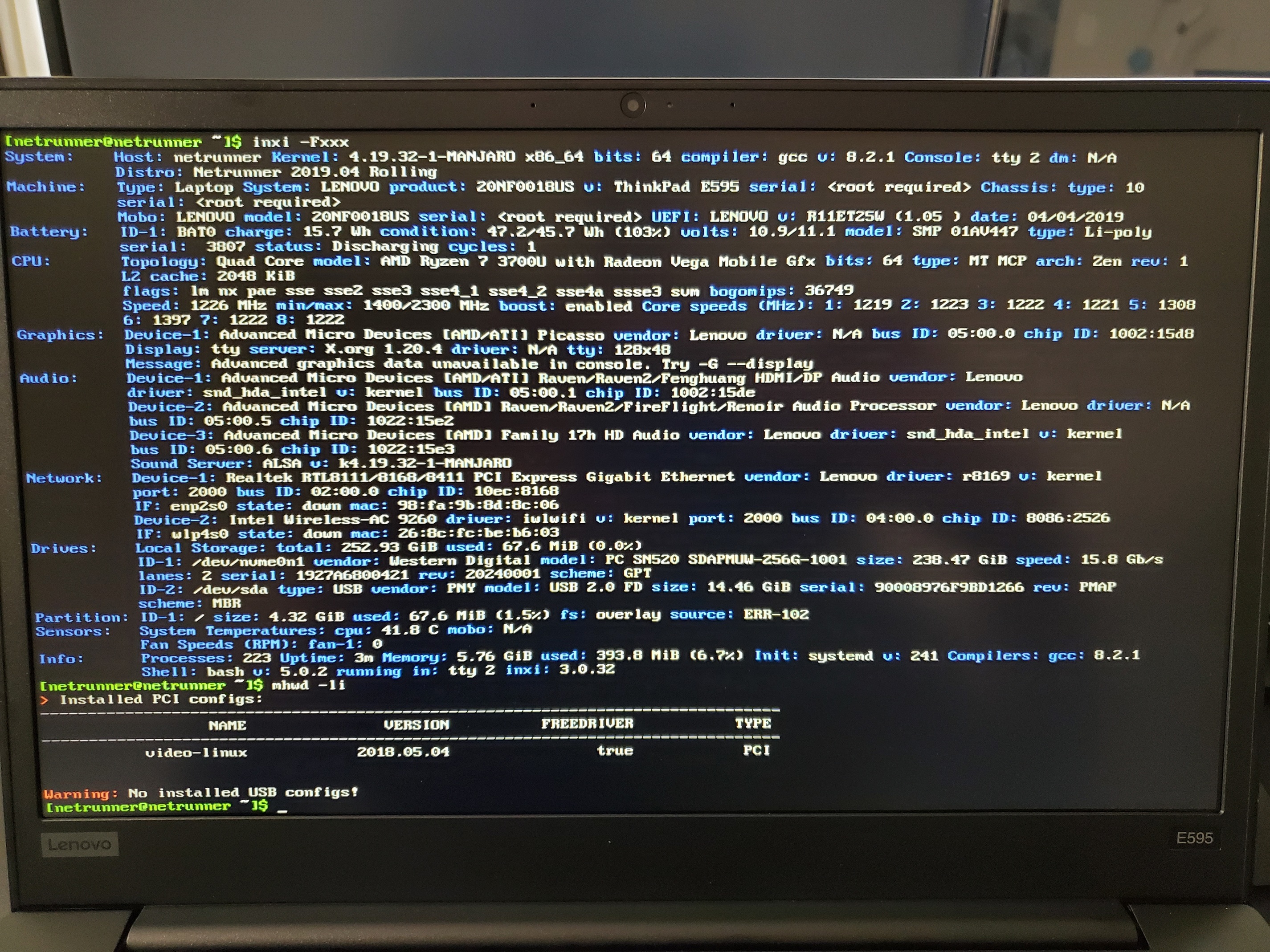
I did however go into try 2 and get the listing of inxi -Fxxx ( which was needed on a different forum ) and this is my output . I don’t know if this helps at all.
---
### Author:  [@AJSlye](https://support.blue-systems.com/u/AJSlye)
#### Post date: [September 30, 2019, 12:07am UTC](https://support.blue-systems.com/t/start-job-for-tlp-hang-up/4918/5 "2019-09-30T00:07:44Z")
If you can get into tty2 through tty6, then your system is not hung on tlp.
Systemd runs operations in parallel, what is on the screen may not necessarily be causing an issue.
It’s more likely that X, or SDDM isn’t loading properly.
No inxi doesn’t help here.
First lets see what is going on:
```auto
systemd-analyze blame
```
Then we need to look at the error messages in your log:
```auto
journalctl -p 3 -xb
```
---
### Author:  [@rgif](https://support.blue-systems.com/u/rgif)
#### Post date: [September 30, 2019, 2:47am UTC](https://support.blue-systems.com/t/start-job-for-tlp-hang-up/4918/6 "2019-09-30T02:47:21Z")
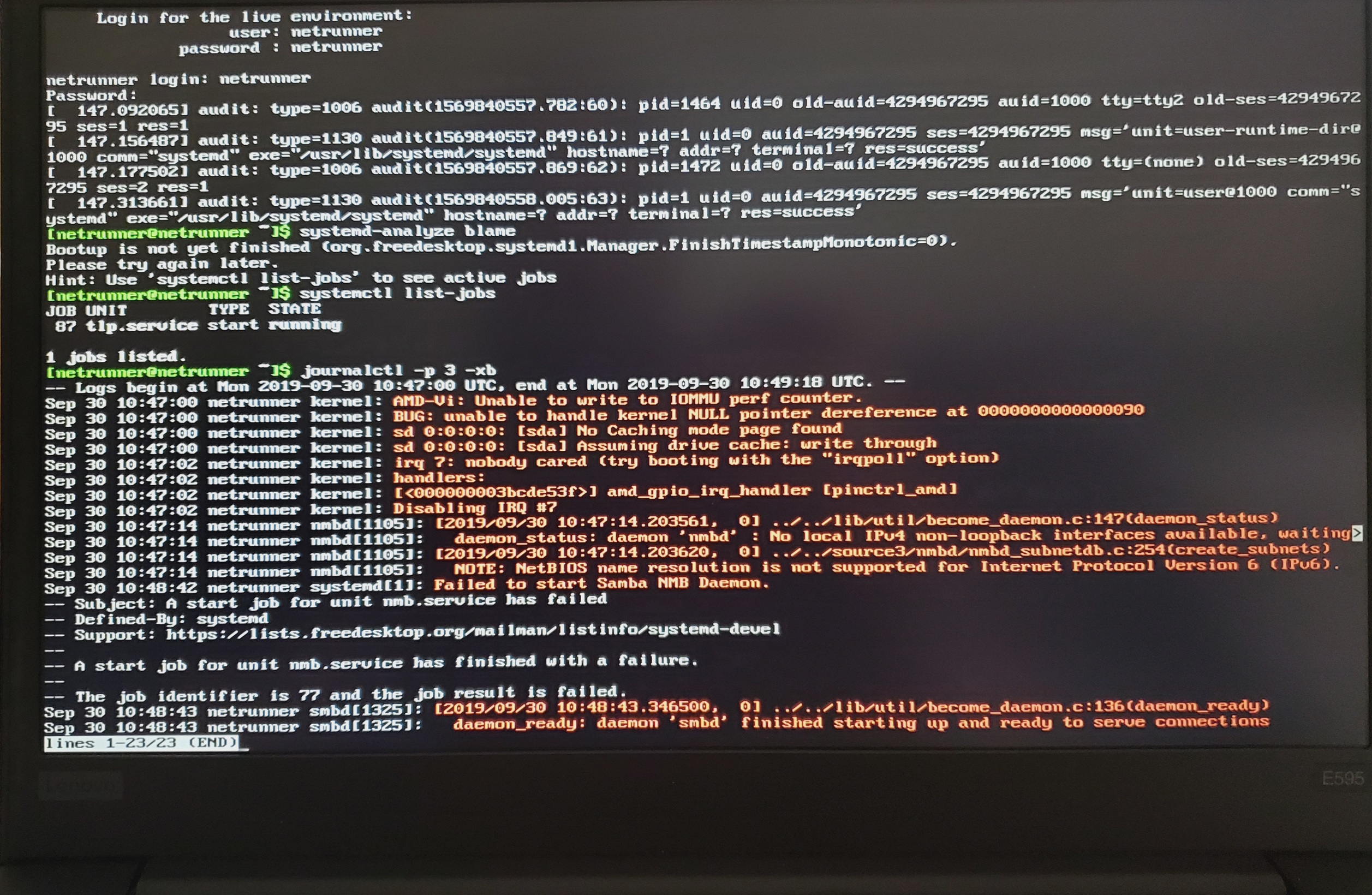
This is what I got . I also ran the command it suggested.
---
### Author:  [@AJSlye](https://support.blue-systems.com/u/AJSlye)
#### Post date: [September 30, 2019, 3:47am UTC](https://support.blue-systems.com/t/start-job-for-tlp-hang-up/4918/7 "2019-09-30T03:47:56Z")
This will more than likely not solve the issue, but when in console 2 run `sudo systemctl stop tlp.service`, just to see what happens.
Please the output of inxi -G
---
### Author:  [@rgif](https://support.blue-systems.com/u/rgif)
#### Post date: [September 30, 2019, 4:03am UTC](https://support.blue-systems.com/t/start-job-for-tlp-hang-up/4918/8 "2019-09-30T04:03:37Z")
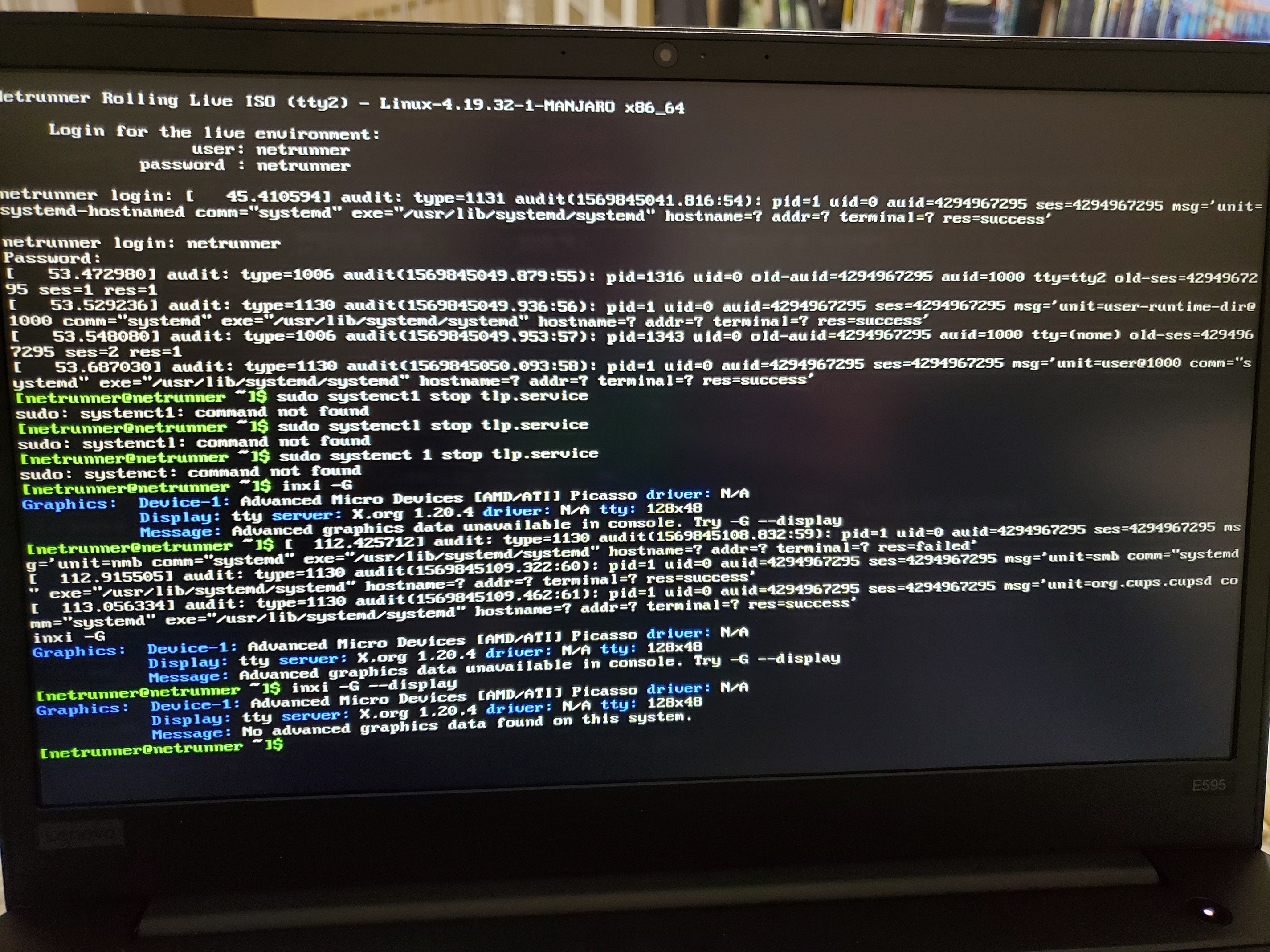
It says that the command systenct1 or systenctl is not found. This is the output of the rest though .
---
### Author:  [@AJSlye](https://support.blue-systems.com/u/AJSlye)
#### Post date: [September 30, 2019, 7:29am UTC](https://support.blue-systems.com/t/start-job-for-tlp-hang-up/4918/9 "2019-09-30T07:29:48Z")
That was a typo, sorry about that.
Anyway, the command is `sudo systemctl stop tlp.service`
Your not loading any video drivers.
Your not selecting non-free when booting the ISO are you?
---
### Author:  [@rgif](https://support.blue-systems.com/u/rgif)
#### Post date: [September 30, 2019, 11:26am UTC](https://support.blue-systems.com/t/start-job-for-tlp-hang-up/4918/10 "2019-09-30T11:26:13Z")
I’ve tried with free and non free . Both stop at the same place , I just happened to not select it that time .
---
### Author:  [@rgif](https://support.blue-systems.com/u/rgif)
#### Post date: [September 30, 2019, 12:23pm UTC](https://support.blue-systems.com/t/start-job-for-tlp-hang-up/4918/11 "2019-09-30T12:23:38Z")
The stop command just caused the timer to stop completly. I can still switch ttys and type commands but the start job isn’t running anymore .
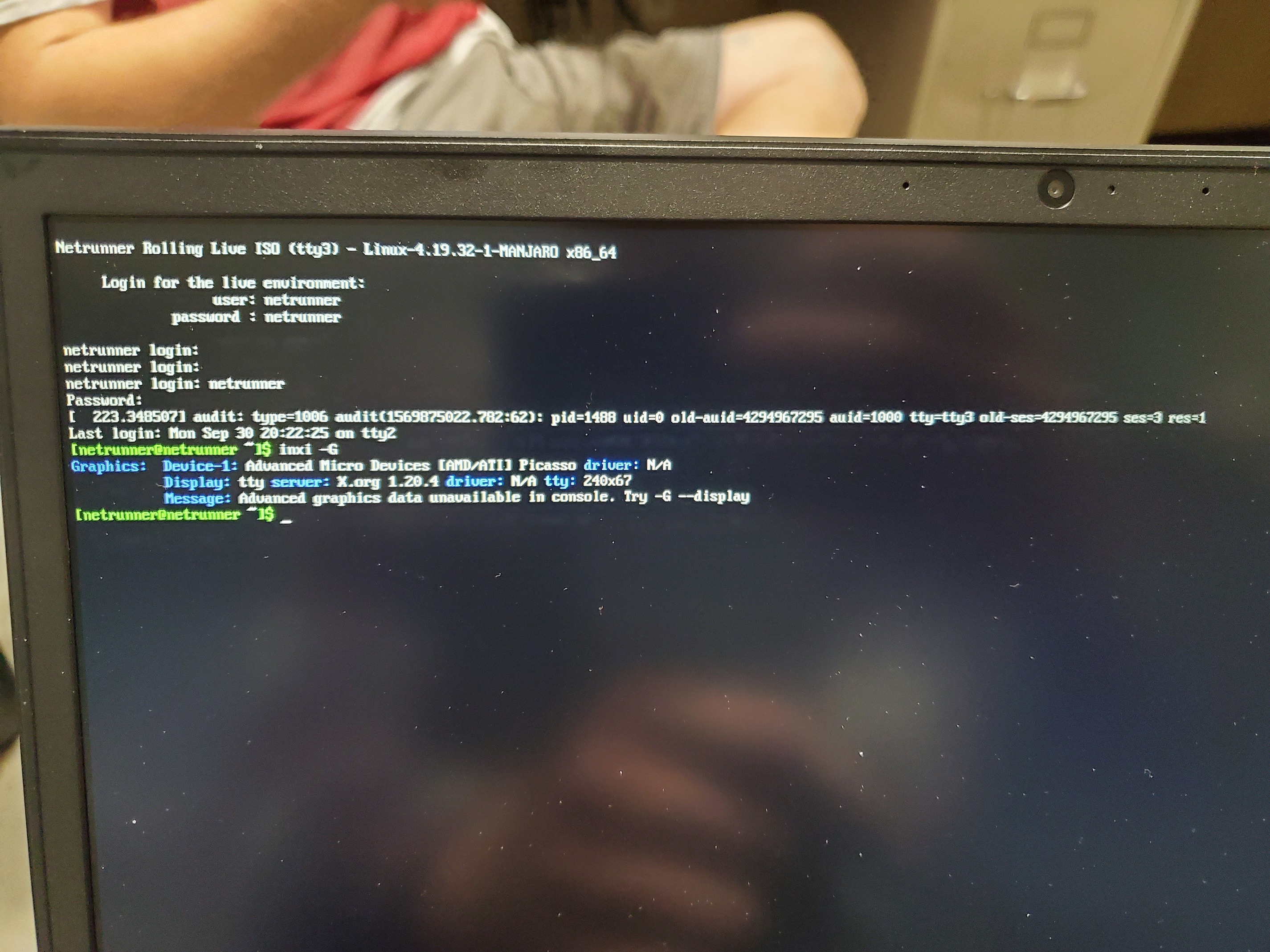
This is the results of inxi -G with non-free drivers.
---
### Author:  [@rgif](https://support.blue-systems.com/u/rgif)
#### Post date: [September 30, 2019, 12:34pm UTC](https://support.blue-systems.com/t/start-job-for-tlp-hang-up/4918/12 "2019-09-30T12:34:06Z")
Also the CPU is an AMD 7 3700U with integrated Vega 10 graphics. I did get Manjaro to install on it just fine though. So it must be something with netrunner specifically.
---
### Author:  [@AJSlye](https://support.blue-systems.com/u/AJSlye)
#### Post date: [September 30, 2019, 12:59pm UTC](https://support.blue-systems.com/t/start-job-for-tlp-hang-up/4918/13 "2019-09-30T12:59:57Z")
Still no driver loaded.
You should be getting something like this:
[xxxx@xxxxx ~]$ inxi -G
Graphics: Device-1: Intel HD Graphics 620 driver: **i915** v: kernel
Display: x11 server: [X.Org](http://X.Org) 1.20.5 driver: **intel** unloaded: modesetting tty: 240x67
Message: Advanced graphics data unavailable in console. Try -G --display
or:
[xxxx@xxxxx ~]$ inxi -G --display
Graphics: Device-1: Intel HD Graphics 620 driver: **i915** v: kernel
Display: x11 server: [X.Org](http://X.Org) 1.20.5 driver: **intel** unloaded: modesetting tty: N/A
OpenGL: renderer: Mesa DRI Intel HD Graphics 620 (Kaby Lake GT2) v: 4.5 Mesa 19.1.5
---
### Author:  [@rgif](https://support.blue-systems.com/u/rgif)
#### Post date: [September 30, 2019, 1:06pm UTC](https://support.blue-systems.com/t/start-job-for-tlp-hang-up/4918/14 "2019-09-30T13:06:10Z")
Which I don’t get because Manjaro ( which it’s based on ) just loaded with no issues.
---
### Author:  [@AJSlye](https://support.blue-systems.com/u/AJSlye)
#### Post date: [September 30, 2019, 1:10pm UTC](https://support.blue-systems.com/t/start-job-for-tlp-hang-up/4918/15 "2019-09-30T13:10:54Z")
We use the exact same method and settings as Manjaro when it comes to drivers, etc. on our ISO’s.
Which ISO did you use (KDE, XFCE)?
Did you use an ISO from Manjaro with the same kernel, etc. (aka from around the same time)?
Now, the latest ISO’s from Manjaro would be newer, and so would the kernel, drivers, mhwd, etc…
---
### Author:  [@rgif](https://support.blue-systems.com/u/rgif)
#### Post date: [September 30, 2019, 1:12pm UTC](https://support.blue-systems.com/t/start-job-for-tlp-hang-up/4918/16 "2019-09-30T13:12:29Z")
I downloaded the suggested ones from both . I also used KDE on both as well. I didn’t check kernel numbers but I just went with the " download here " links.
---
### Author:  [@AJSlye](https://support.blue-systems.com/u/AJSlye)
#### Post date: [September 30, 2019, 1:14pm UTC](https://support.blue-systems.com/t/start-job-for-tlp-hang-up/4918/17 "2019-09-30T13:14:19Z")
I figured as much, to compare you would need to use an older ISO from Manjaro.
At any-rate, try re-downloading our ISO, or use a different USB stick?
I’ve had issues like this before just from a bad stick.
---
### Author:  [@rgif](https://support.blue-systems.com/u/rgif)
#### Post date: [September 30, 2019, 1:18pm UTC](https://support.blue-systems.com/t/start-job-for-tlp-hang-up/4918/18 "2019-09-30T13:18:23Z")
I actually already have. I used a new USB stick as well as redownloading the iso. I’ve also tried writing it with suse studio and dd.
So netrunner is based on Manjaro , but not as up to date ? Will I just need to wait for a newer kernel with netrunner then ?
---
### Author:  [@AJSlye](https://support.blue-systems.com/u/AJSlye)
#### Post date: [September 30, 2019, 1:35pm UTC](https://support.blue-systems.com/t/start-job-for-tlp-hang-up/4918/19 "2019-09-30T13:35:13Z")
Not exactly, our ISO is just not as new as Manjaro’s latest ISO.
It’s still a rolling release.
However, I’m not sure what kernel first supported your integrated gpu.
From your screenshots though, there is no kernel driver loading for it.
---
### Author:  [@AJSlye](https://support.blue-systems.com/u/AJSlye)
#### Post date: [September 30, 2019, 5:17pm UTC](https://support.blue-systems.com/t/start-job-for-tlp-hang-up/4918/20 "2019-09-30T17:17:23Z")
Here is a review from back in June that had the same issue as your having, but using the Manjaro ISO at that time:
> **[Lenovo E595 Ryzen 3700U Review and Linux](https://forum.level1techs.com/t/lenovo-e595-ryzen-3700u-review-and-linux/143923)**
>
> So as a fresh high school graduate going to college for a computer science program very soon, I like many others thought that now would be a very good time to purchase a laptop. My requirements aren’t too heavy. Since I want to run Linux and also...
Quote:
> The previous E585 had BIOS problems that made running Linux more difficult but not impossible. I have good news and bad news. The good news is that Lenovo fixed that problem in this model and most likely in the E/T485 as well. The bad news was that I encountered other minor obstacles. The first one was that on booting Manjaro 18.04 caused the laptop to be stuck on loading ‘TLP system startup/shutdown’. I’m not sure if this also effects other Linux distros but the problem was fixed in newer kernels so I downloaded the release candidate for 18.1 and it booted successfully.
P.S. I’m still looking into what could be causing your issue and a hopefully a solution to it.
[Next page](https://support.blue-systems.com/t/start-job-for-tlp-hang-up/4918.md?page=2)