# Synaptic Error
**URL:** https://support.blue-systems.com/t/synaptic-error/5155
**Category:** Netrunner Core
**Created:** [April 22, 2021, 3:03pm UTC](https://support.blue-systems.com/t/synaptic-error/5155 "2021-04-22T15:03:24Z")
**Posts on this page:** 13
**Page:** 1
### Author:  [@PrimeSuspect](https://support.blue-systems.com/u/PrimeSuspect)
#### Post date: [April 22, 2021, 3:03pm UTC](https://support.blue-systems.com/t/synaptic-error/5155/1 "2021-04-22T15:03:24Z")
I just downloaded the Core version and installed it onto two systems. When I reload Synaptic prior to updating I get this:
The repository ‘[http://deb.netrunner.com/dci/packages/netrunner](http://deb.netrunner.com/dci/packages/netrunner) netrunner-core-2001 Release’ no longer has a Release file.
Please advise how to fix it?
---
### Author:  [@leszek](https://support.blue-systems.com/u/leszek)
#### Post date: [April 23, 2021, 11:20am UTC](https://support.blue-systems.com/t/synaptic-error/5155/2 "2021-04-23T11:20:05Z")
We are in the middle of changing the server. It should be fixed soon. I will keep you informed.
**edit:** Please try again. It should work.
---
### Author:  [@PrimeSuspect](https://support.blue-systems.com/u/PrimeSuspect)
#### Post date: [April 23, 2021, 11:44am UTC](https://support.blue-systems.com/t/synaptic-error/5155/3 "2021-04-23T11:44:00Z")
Thank you for responding. Since posting I found the review on LinuxInsider and it really didn’t instill a lot of confidence regarding perhaps yet more changes or the future of the project full stop. What is the official position? Can people commit to Netrunner with an assurance it will continue as is without forking off in another direction or stopping altogether?
---
### Author:  [@PrimeSuspect](https://support.blue-systems.com/u/PrimeSuspect)
#### Post date: [April 23, 2021, 1:24pm UTC](https://support.blue-systems.com/t/synaptic-error/5155/4 "2021-04-23T13:24:52Z")
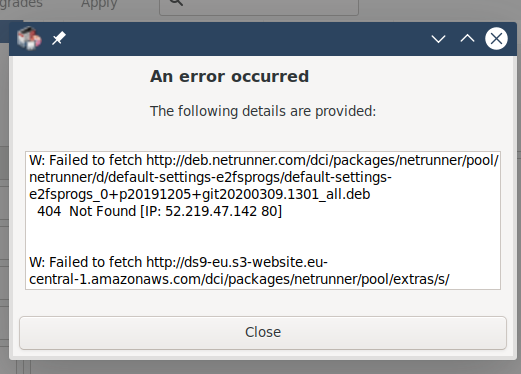
Update: As per 10.15am Brazil time Synaptic was able to update but then returned a different error trying to download the packages.
---
### Author:  [@Justin](https://support.blue-systems.com/u/Justin)
#### Post date: [April 23, 2021, 2:28pm UTC](https://support.blue-systems.com/t/synaptic-error/5155/5 "2021-04-23T14:28:30Z")
The team are currently working on resolving this issue. We will provide an update once the issue is resolved. Thank you for your patience.
---
### Author:  [@PrimeSuspect](https://support.blue-systems.com/u/PrimeSuspect)
#### Post date: [April 23, 2021, 5:49pm UTC](https://support.blue-systems.com/t/synaptic-error/5155/6 "2021-04-23T17:49:26Z")
Thanks for keeping us informed. We too have lots of fun with hardware and software maintenance. We’ve just updated our own site to Drupal Core 7.80 and thankfully it didn’t fall over when we went back online.
---
### Author:  [@DenW](https://support.blue-systems.com/u/DenW)
#### Post date: [April 23, 2021, 10:02pm UTC](https://support.blue-systems.com/t/synaptic-error/5155/7 "2021-04-23T22:02:44Z")
In Synaptic I changed the source [deb.netrunner.com/dci/packages/netrunner](http://deb.netrunner.com/dci/packages/netrunner) from netrunner2001 to 2101 but had to delete calamares ds9-artwork ds9-common.
Now no error message on reloading updates but not sure if I am missing anything!
However I am now getting an error message when I try to update one package:
‘artwork-inf-theme-netrunner-indigo’:
Error -
E: /var/cache/apt/archives/artwork-lnf-theme-netrunner-indigo\_1.0+p20201123+git20210111.0301\_all.deb: trying to overwrite ‘/usr/share/aurorae/themes/Indigo/.directory’, which is also in package aurorae-theme-indigo 1.0+p20191205+git20200216.2204
Any help appreciated (Note: this is an upgraded installation form NR2001 to NR2101)
---
### Author:  [@leszek](https://support.blue-systems.com/u/leszek)
#### Post date: [April 26, 2021, 8:22am UTC](https://support.blue-systems.com/t/synaptic-error/5155/8 "2021-04-26T08:22:58Z")
> [@DenW](#):
>
> However I am now getting an error message when I try to update one package:
> ‘artwork-inf-theme-netrunner-indigo’:
> Error -
> E: /var/cache/apt/archives/artwork-lnf-theme-netrunner-indigo\_1.0+p20201123+git20210111.0301\_all.deb: trying to overwrite ‘/usr/share/aurorae/themes/Indigo/.directory’, which is also in package aurorae-theme-indigo 1.0+p20191205+git20200216.2204
Force the overwrite with
**sudo dpkg -i --force-overwrite /var/cache/apt/archives/artwork-lnf-theme-netrunner-indigo\_1.0+p20201123+git20210111.0301\_all.deb** do the same for the rest that might pop up.
In general this error should be about the 20.01 repos so for upgrade questions maybe open up a new thread.
---
### Author:  [@DenW](https://support.blue-systems.com/u/DenW)
#### Post date: [April 26, 2021, 1:21pm UTC](https://support.blue-systems.com/t/synaptic-error/5155/9 "2021-04-26T13:21:08Z")
> [@leszek](#):
>
> **sudo dpkg -i --force-overwrite /var/cache/apt/archives/artwork-lnf-theme-netrunner-indigo\_1.0+p20201123+git20210111.0301\_all.deb** do the same for the rest that might pop up.
Thanks for your prompt response. Worked fine.
Just to point out that my first comment was really a response to PrimeSuspect’s first request re Synaptic error message, which I also received, and my comment indicated how I resolved the problem, rightly or wrongly (also by dropping calamares and ds9 references)! However this led to the second error message which I thought might be related to my “solution”. Just saying.
Have been using and enjoying Netrunner for several versions now and enjoy the unique modifications you incorporate in the distro. Keep up the good work! Thanks again Leszek.
---
### Author:  [@PrimeSuspect](https://support.blue-systems.com/u/PrimeSuspect)
#### Post date: [April 26, 2021, 4:16pm UTC](https://support.blue-systems.com/t/synaptic-error/5155/10 "2021-04-26T16:16:53Z")
I too was able to work round this but IMO this is not the kind of solution general users should be expected to perform or indeed be capable of. The only real solution is for folks to be able to install the distro and update it without any error messages.
---
### Author:  [@leszek](https://support.blue-systems.com/u/leszek)
#### Post date: [April 27, 2021, 7:55am UTC](https://support.blue-systems.com/t/synaptic-error/5155/11 "2021-04-27T07:55:55Z")
There is usually no need to upgrade that way. Usually you just keep using the repos you have and just update normally.
---
### Author:  [@PrimeSuspect](https://support.blue-systems.com/u/PrimeSuspect)
#### Post date: [April 27, 2021, 12:56pm UTC](https://support.blue-systems.com/t/synaptic-error/5155/12 "2021-04-27T12:56:20Z")
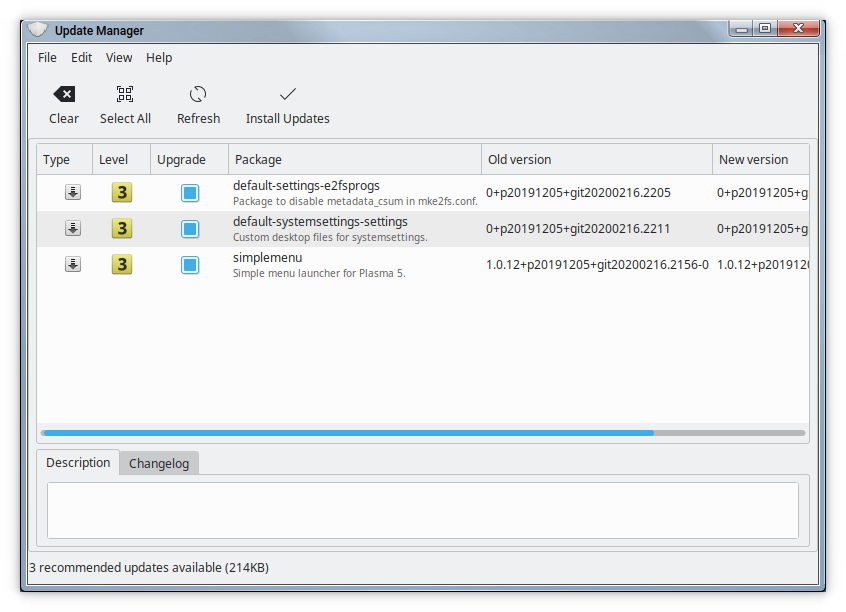
Maybe it’s me then not understanding something here but when I boot the PC the update icon in the tray indicates updates available. Clicking this opens the window shown here but trying to then download and install these returns the error shown previously above.
---
### Author:  [@leszek](https://support.blue-systems.com/u/leszek)
#### Post date: [April 27, 2021, 3:09pm UTC](https://support.blue-systems.com/t/synaptic-error/5155/13 "2021-04-27T15:09:48Z")
Yes we are aware of this and trying to fix this.