# Update-Sources problem
**URL:** https://support.blue-systems.com/t/update-sources-problem/5219
**Category:** Netrunner
**Created:** [December 15, 2021, 11:40am UTC](https://support.blue-systems.com/t/update-sources-problem/5219 "2021-12-15T11:40:50Z")
**Posts on this page:** 7
**Page:** 1
### Author:  [@proxo](https://support.blue-systems.com/u/proxo)
#### Post date: [December 15, 2021, 11:40am UTC](https://support.blue-systems.com/t/update-sources-problem/5219/1 "2021-12-15T11:40:50Z")
There´s a new message:
Das Depot »[http://ds9-eu.s3-website.eu-central-1.amazonaws.com/dci/packages](http://ds9-eu.s3-website.eu-central-1.amazonaws.com/dci/packages) buster Release« enthält keine Release-Datei.
I don´t know, where this comes from. I don´t have a source with this adress.
---
### Author:  [@leszek](https://support.blue-systems.com/u/leszek)
#### Post date: [December 15, 2021, 1:09pm UTC](https://support.blue-systems.com/t/update-sources-problem/5219/2 "2021-12-15T13:09:46Z")
This is indeed weird. [deb.netrunner.com](http://deb.netrunner.com) uses s3 which resolves to this server but we never had a “buster” component there. So please deactivate it in your software properties via synaptic or the software sources tool.
---
### Author:  [@proxo](https://support.blue-systems.com/u/proxo)
#### Post date: [December 16, 2021, 11:08am UTC](https://support.blue-systems.com/t/update-sources-problem/5219/3 "2021-12-16T11:08:33Z")
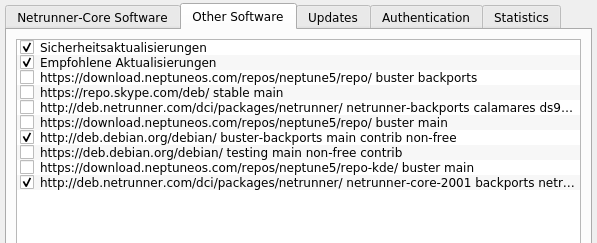
What exactly shall I deactivate? Have a look at my repos.
And what package in synaptic?
---
### Author:  [@leszek](https://support.blue-systems.com/u/leszek)
#### Post date: [December 16, 2021, 3:12pm UTC](https://support.blue-systems.com/t/update-sources-problem/5219/4 "2021-12-16T15:12:57Z")
I have to say the “Sicherheitsaktualisierungen” and “Empfohlene Aktualisierungen” look a bit suspicious as by default we don’t have such one. Try deactivating one refreshing and see if that solves the issue. Maybe you need to deactivate both of them.
You can also manually check the contents of **/etc/apt/sources.list** and the files in **/etc/apt/sources.list.d/** directory to see if you find the culprit there. If you find it you mayb remove the whole deb line in it aswell to get rid of the malfunctioning software source.
---
### Author:  [@proxo](https://support.blue-systems.com/u/proxo)
#### Post date: [December 17, 2021, 10:54am UTC](https://support.blue-systems.com/t/update-sources-problem/5219/5 "2021-12-17T10:54:57Z")
Thanks a lot.
I deactivated “Sicherheitsaktualisierungen” and “Empfohlene Aktualisierungen” without any effect.
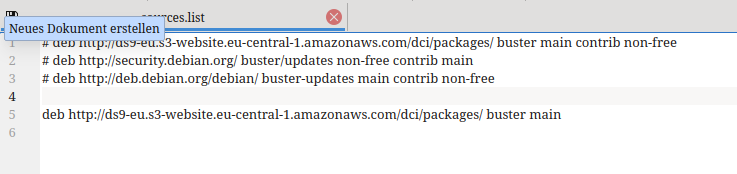
But I could find »[http://ds9-eu.s3-website.eu-central-1.amazonaws.com/dci/packages](http://ds9-eu.s3-website.eu-central-1.amazonaws.com/dci/packages) buster Release« in “/etc/apt/sources.list” and deactivated it.
No more message. But:
“Aktualisierungsverwaltung” says the system is up to date.
Inserting “sudo apt upgrade” at the commandline brings a lot of things to be done.
First of all out of that source: [Index of /debian](http://deb.debian.org/debian) buster-backports/main amd64.
I did so and everything´s ok.
My idea now was: Why not putting this source to my sources list. Done and new check for updates, result: Das Depot »[http://ds9-eu.s3-website.eu-central-1.amazonaws.com/dci/packages](http://ds9-eu.s3-website.eu-central-1.amazonaws.com/dci/packages) buster Release« enthält keine Release-Datei.
Looking into my /etc/apt/sources.list: Here it is again!
---
### Author:  [@leszek](https://support.blue-systems.com/u/leszek)
#### Post date: [December 17, 2021, 11:19am UTC](https://support.blue-systems.com/t/update-sources-problem/5219/6 "2021-12-17T11:19:10Z")
> [@proxo](#):
>
> “Aktualisierungsverwaltung” says the system is up to date.
Yeah that is a bit more conservative and does not install upgrades if it thinks it might break stuff.
> [@](#):
>
> Looking into my /etc/apt/sources.list: Here it is again!
Very weird. Can you comment it out and don’t touch the software sources tool anymore. It might be a bug that this is adding it all the time when you perform a change other than activating or deactivating one of the other sources.
---
### Author:  [@proxo](https://support.blue-systems.com/u/proxo)
#### Post date: [December 17, 2021, 4:54pm UTC](https://support.blue-systems.com/t/update-sources-problem/5219/7 "2021-12-17T16:54:22Z")
Yes, I did so and it´s ok so far.
Thank you.