# Window Title Bar Title absent or flashing
**URL:** https://support.blue-systems.com/t/window-title-bar-title-absent-or-flashing/4776
**Category:** Netrunner Rolling
**Created:** [May 13, 2019, 12:27am UTC](https://support.blue-systems.com/t/window-title-bar-title-absent-or-flashing/4776 "2019-05-13T00:27:26Z")
**Posts on this page:** 20
**Page:** 1
### Author:  [@CranKey](https://support.blue-systems.com/u/CranKey)
#### Post date: [May 13, 2019, 12:27am UTC](https://support.blue-systems.com/t/window-title-bar-title-absent-or-flashing/4776/1 "2019-05-13T00:27:26Z")
Recent install of Rolling 19.04 that’s up to date; running default settings but with dual monitors (1 @ 16x9 1080p and 1 @ 4:3, with the desktop expanded across both)
Like the subject line says, the block that the window title is displayed in blacks out or flashes, though it happens only randomly. I’ve noticed that if I move the mouse over the window control buttons (max, min, kill) the flashing stops and the title is displayed properly, but moving the mouse away allows it to resume.
Not much else to say about it but I can supply more information if requested.
OpenGL driver R600G
Thanks
---
### Author:  [@leszek](https://support.blue-systems.com/u/leszek)
#### Post date: [May 13, 2019, 7:19am UTC](https://support.blue-systems.com/t/window-title-bar-title-absent-or-flashing/4776/2 "2019-05-13T07:19:31Z")
Definitely something wrong with the driver.
Can you check **inix -G** to see which driver is in use radeon or amdgpu
---
### Author:  [@CranKey](https://support.blue-systems.com/u/CranKey)
#### Post date: [May 13, 2019, 4:38pm UTC](https://support.blue-systems.com/t/window-title-bar-title-absent-or-flashing/4776/3 "2019-05-13T16:38:30Z")
```
[crankey@HPPCL ~]$ inix -G
bash: inix: command not found
[crankey@HPPCL ~]$ ls /usr/bin/*inix*
/usr/bin/fsck.minix /usr/bin/mkfs.minix
[crankey@HPPCL ~]$ ls /usr/sbin/*inix*
/usr/sbin/fsck.minix /usr/sbin/mkfs.minix
```
[crankey@HPPCL ~]$ dmesg | grep radeon
[8.686187] [drm] radeon kernel modesetting enabled.
[8.686296] fb: switching to radeondrmfb from VESA VGA
[8.687516] radeon 0000:01:00.0: VRAM: 1024M 0x0000000000000000 - 0x000000003FFFFFFF (1024M used)
[8.687517] radeon 0000:01:00.0: GTT: 1024M 0x0000000040000000 - 0x000000007FFFFFFF
[8.687649] [drm] radeon: 1024M of VRAM memory ready
[8.687650] [drm] radeon: 1024M of GTT memory ready.
[9.132876] [drm] radeon: dpm initialized
[9.166597] [drm] enabling PCIE gen 2 link speeds, disable with radeon.pcie\_gen2=0
[9.188073] radeon 0000:01:00.0: WB enabled
[9.188082] radeon 0000:01:00.0: fence driver on ring 0 use gpu addr 0x0000000040000c00 and cpu addr 0x000000003fd294dd
[9.188088] radeon 0000:01:00.0: fence driver on ring 3 use gpu addr 0x0000000040000c0c and cpu addr 0x0000000090bb381e
[9.188865] radeon 0000:01:00.0: fence driver on ring 5 use gpu addr 0x0000000000072118 and cpu addr 0x000000004ff2aab8
[9.188877] radeon 0000:01:00.0: radeon: MSI limited to 32-bit
[9.188969] radeon 0000:01:00.0: radeon: using MSI.
[9.189021] [drm] radeon: irq initialized.
[10.203982] fbcon: radeondrmfb (fb0) is primary device
[10.203986] radeon 0000:01:00.0: fb0: radeondrmfb frame buffer device
[10.228933] [drm] Initialized radeon 2.50.0 20080528 for 0000:01:00.0 on minor 0
[18.292115] radeon\_dp\_aux\_transfer\_native: 74 callbacks suppressed
[68.602160] radeon\_dp\_aux\_transfer\_native: 74 callbacks suppressed
[crankey@HPPCL ~]$ dmesg | grep amdgpu
_there are no results for this command_
---
### Author:  [@AJSlye](https://support.blue-systems.com/u/AJSlye)
#### Post date: [May 13, 2019, 4:52pm UTC](https://support.blue-systems.com/t/window-title-bar-title-absent-or-flashing/4776/4 "2019-05-13T16:52:45Z")
That was a typo, it’s `inxi -G`
---
### Author:  [@CranKey](https://support.blue-systems.com/u/CranKey)
#### Post date: [May 13, 2019, 5:04pm UTC](https://support.blue-systems.com/t/window-title-bar-title-absent-or-flashing/4776/5 "2019-05-13T17:04:31Z")
[crankey@HPPCL ~]$ inxi -G
Graphics: Device-1: Advanced Micro Devices [AMD/ATI] Barts PRO [Radeon HD 6850] driver: radeon v: kernel
Display: x11 server: [X.Org](http://X.Org) 1.20.4 driver: radeon FAILED: ati unloaded: modesetting tty: N/A
OpenGL: renderer: AMD BARTS (DRM 2.50.0 / 4.19.36-1-MANJARO LLVM 8.0.0) v: 3.3 Mesa 19.0.3
---
### Author:  [@AJSlye](https://support.blue-systems.com/u/AJSlye)
#### Post date: [May 13, 2019, 5:16pm UTC](https://support.blue-systems.com/t/window-title-bar-title-absent-or-flashing/4776/6 "2019-05-13T17:16:04Z")
> [@CranKey](#):
>
> driver: radeon FAILED: ati unloaded: modesetting
Now, that concerns me.
What is the output for `mhwd -li`
PS, you could also look under system settings \> hardware detection.
---
### Author:  [@CranKey](https://support.blue-systems.com/u/CranKey)
#### Post date: [May 13, 2019, 5:49pm UTC](https://support.blue-systems.com/t/window-title-bar-title-absent-or-flashing/4776/7 "2019-05-13T17:49:01Z")
## [crankey@HPPCL ~]$ mhwd -li \> Installed PCI configs:
## NAME VERSION FREEDRIVER TYPE
video-linux 2018.05.04 true PCI
network-r8168 2016.04.20 true PCI
Warning: No installed USB configs!
[crankey@HPPCL ~]$
---
### Author:  [@AJSlye](https://support.blue-systems.com/u/AJSlye)
#### Post date: [May 13, 2019, 5:53pm UTC](https://support.blue-systems.com/t/window-title-bar-title-absent-or-flashing/4776/8 "2019-05-13T17:53:27Z")
It looks like the kernel module failed to load so the ati driver unloaded, leaving you using the modesetting driver.
What does system settings \> hardware detection show?
Do you have a hybrid setup?
---
### Author:  [@CranKey](https://support.blue-systems.com/u/CranKey)
#### Post date: [May 13, 2019, 6:57pm UTC](https://support.blue-systems.com/t/window-title-bar-title-absent-or-flashing/4776/9 "2019-05-13T18:57:47Z")
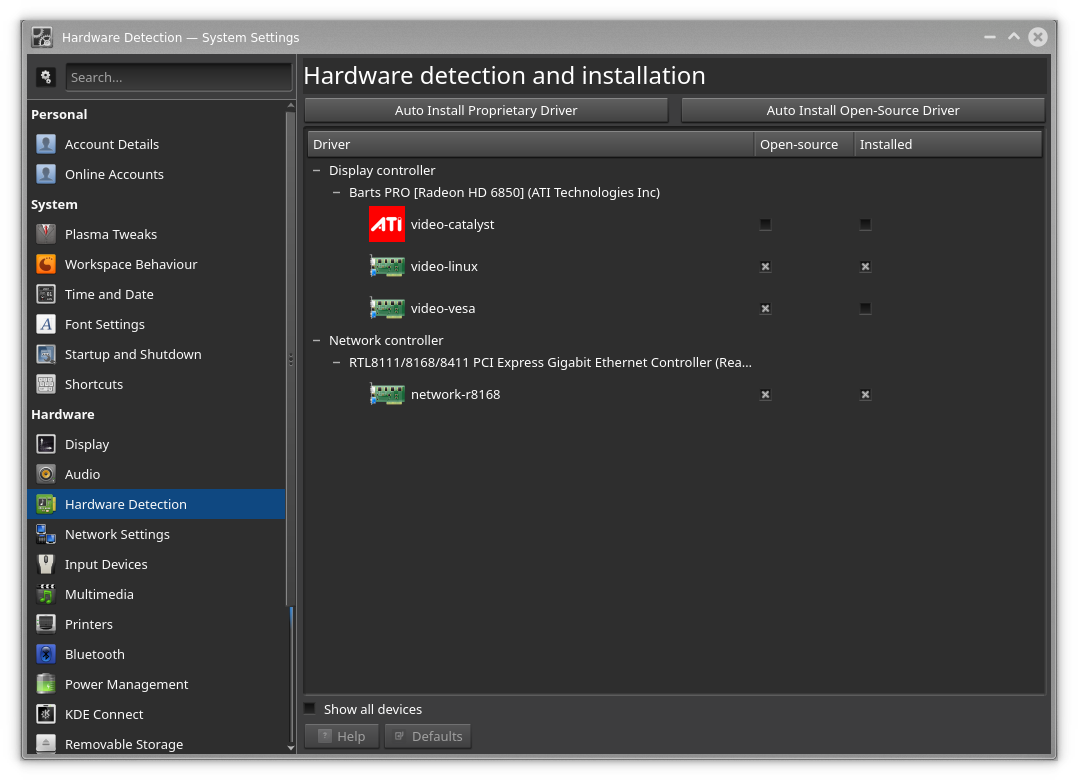
I’m not sure what you mean by a hybrid system but I do have a dual monitor setup. One is a 16x9 Samsung LED and the other is a rather old Dell 4x3. I’m assuming that the 16x9 is running at 1080p and I don’t know what the 4x3 is running at, but objects on each seem to be about the same size. The two monitors are being used as a single extended desktop and seem to work fine the way they were setup by default during the installation.
I have posted another issue on here about windows not moving between virtual desktops when commanded to do so. Perhaps these two issues are related?
---
### Author:  [@AJSlye](https://support.blue-systems.com/u/AJSlye)
#### Post date: [May 13, 2019, 8:35pm UTC](https://support.blue-systems.com/t/window-title-bar-title-absent-or-flashing/4776/10 "2019-05-13T20:35:49Z")
> [@AJSlye](#):
>
> driver: radeon FAILED: ati unloaded: modesetting
OK, I read this line wrong.
The radeon driver is the kernel driver and it is in use.
However, the ati (xorg driver) failed to load, and the modesetting (xorg driver) was unloaded.
I would check your xorg.n.log files under /var/log/ like this:
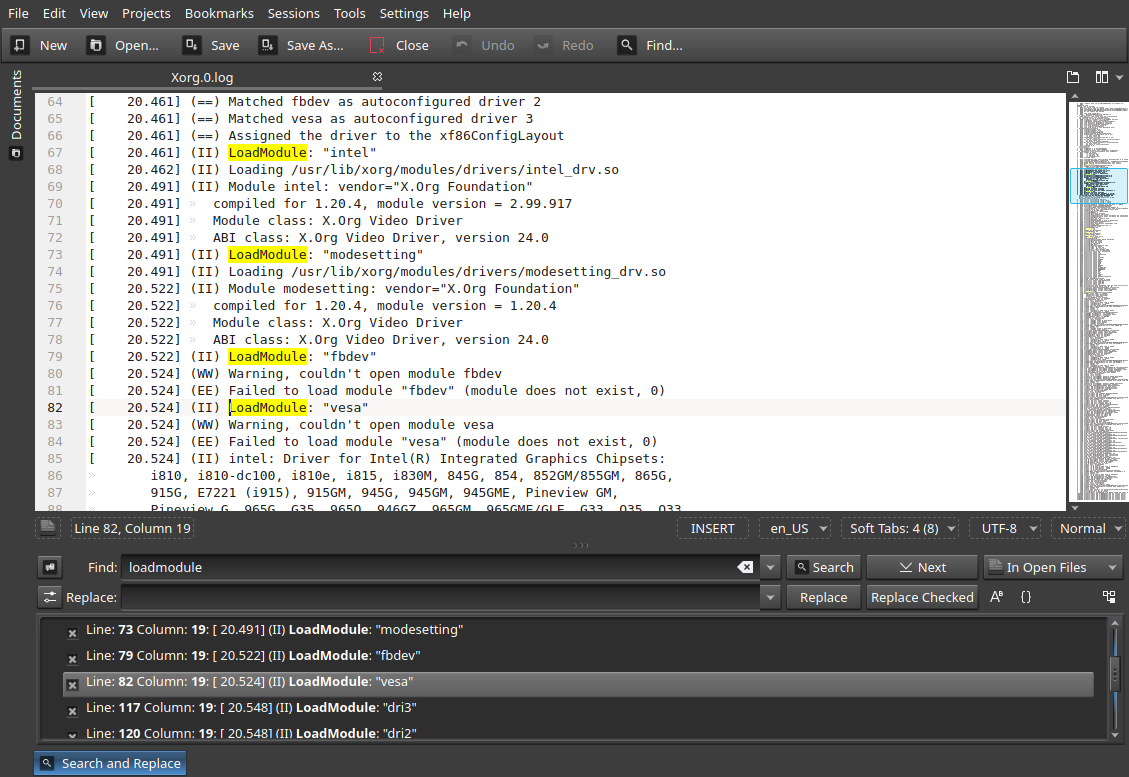
Note: check both LoadModule and UnloadModule lines.
---
### Author:  [@CranKey](https://support.blue-systems.com/u/CranKey)
#### Post date: [May 14, 2019, 12:31am UTC](https://support.blue-systems.com/t/window-title-bar-title-absent-or-flashing/4776/11 "2019-05-14T00:31:35Z")
[crankey@HPPCL ~]$ cat /var/log/Xorg.0.log | grep oadModule
[ 15.158] (II) LoadModule: “glx”
[ 15.341] (II) LoadModule: “radeon”
[ 15.384] (II) LoadModule: “ati”
[ 15.389] (II) LoadModule: “modesetting”
[ 15.390] (II) LoadModule: “fbdev”
[ 15.391] (II) LoadModule: “vesa”
[ 15.398] (II) LoadModule: “fb”
[ 15.405] (II) LoadModule: “dri2”
[ 17.569] (II) LoadModule: “glamoregl”
[ 18.550] (II) LoadModule: “ramdac”
[ 18.550] (II) UnloadModule: “modesetting”
[ 20.070] (II) LoadModule: “libinput”
[crankey@HPPCL ~]$
[15.396] (II) modesetting: Driver for Modesetting Kernel Drivers: kms
[15.396] (II) [KMS] Kernel modesetting enabled.
[15.397] (WW) Falling back to old probe method for modesetting
---
### Author:  [@AJSlye](https://support.blue-systems.com/u/AJSlye)
#### Post date: [May 14, 2019, 1:55am UTC](https://support.blue-systems.com/t/window-title-bar-title-absent-or-flashing/4776/12 "2019-05-14T01:55:54Z")
hmm,
```auto
[jamesk@james-pc ~]$ cat /var/log/Xorg.0.log | grep oadModule
[105197.030] (II) LoadModule: "glx"
[105197.033] (II) LoadModule: "intel"
[105197.034] (II) LoadModule: "modesetting"
[105197.035] (II) LoadModule: "fbdev"
[105197.036] (II) LoadModule: "vesa"
[105197.057] (II) LoadModule: "dri3"
[105197.057] (II) LoadModule: "dri2"
[105197.057] (II) LoadModule: "present"
[105197.057] (II) UnloadModule: "modesetting"
[105197.119] (II) LoadModule: "libinput"
```
Update: I’ve noticed this same behaviour on some of my fresh installs, especially with older graphics chips.
It’s seems to be a compositor issue. Go into System Settings \> Display \> Compositor and change the rendering backend to a different opengl setting ( aka opengl 2.x to opengl 3.x, etc.) and click apply. You can always change the opengl backend setting back again if you experience any other issues.
---
### Author:  [@CranKey](https://support.blue-systems.com/u/CranKey)
#### Post date: [May 14, 2019, 2:46pm UTC](https://support.blue-systems.com/t/window-title-bar-title-absent-or-flashing/4776/13 "2019-05-14T14:46:06Z")
Well, I opened the System Settings window and fortunately it had the wonky title bar happening, and when I changed from OpenGL 2.0 to OpenGL 3.1 the problem disappeared as soon as I hit ‘Apply’. I’ll (obviously) keep an eye on it but I’m guessing it’s fixed.
Any feedback on my other post about being unable to move windows between virtual desktops?
Update: Dolphin window behaves properly. Spotify window still ignores commands to change desktops.
Thanks!
---
### Author:  [@CranKey](https://support.blue-systems.com/u/CranKey)
#### Post date: [June 7, 2019, 5:10pm UTC](https://support.blue-systems.com/t/window-title-bar-title-absent-or-flashing/4776/14 "2019-06-07T17:10:48Z")
I’ve an overdue update to this matter.
The flashing title bar returns after the next reboot. Switching from OpenGL 2.0 to OpenGL 3.1 fixes it until the next reboot, and then switching from 3.1 to 2.0 fixes it again until the next reboot. I haven’t tried logging out and back in to see if it’s the same, but suspending and reawakening the machine leaves the fix intact.
So in summary, both versions of OpenGL work and it would seem that the act of switching between them fixes the issue temporarily. I’m guessing something isn’t loading correctly during the normal boot up procedure and then the switch loads it properly, but that’s just my guess.
Perhaps this is related to another window issue I have after reboot. Starting an application results in the window opening in what’s often a bizarre location and with weird dimensions in some cases and just not quite right in others. I’m running two screens of different sizes with the desktop spread between them. After reboot Firefox opens in a window that’s spread across both screens (but not from end to end) and unusabely short. Spotify opens where I left it, on the small screen on a specific desktop, but while I left it maximized there it returns full screen size but shifted slightly onto the large screen; double-clicking on the title bar to maximize it puts it back in it’s proper place (in this case it happens every time, not just after a reboot). I should note that I’m using the Spotify Dev package because the regular Spotify package would not install successfully.
If these issues aren’t related then I can edit this post to remove the window size issue and put it in a separate post. Just let me know.
Thanks
---
### Author:  [@AJSlye](https://support.blue-systems.com/u/AJSlye)
#### Post date: [June 7, 2019, 6:03pm UTC](https://support.blue-systems.com/t/window-title-bar-title-absent-or-flashing/4776/15 "2019-06-07T18:03:48Z")
These issues might have something to do with either kvantum/theme, and/or, aurora/theme.
Having these on the latest ISO is a new combination for Netrunner Rolling.
---
### Author:  [@CranKey](https://support.blue-systems.com/u/CranKey)
#### Post date: [June 7, 2019, 6:18pm UTC](https://support.blue-systems.com/t/window-title-bar-title-absent-or-flashing/4776/16 "2019-06-07T18:18:19Z")
I’m using
‘Look and Feel’ theme: Netrunner Black
‘Desktop Theme’: Breeze AlphaBlack
Not sure if this info helps. I can’t recall if I switched the themes after install or not but I think I left them as stock and I’m pretty sure I deleted the hidden directories for the old install because I wanted to try out the new look and feel.
---
### Author:  [@AJSlye](https://support.blue-systems.com/u/AJSlye)
#### Post date: [June 7, 2019, 6:32pm UTC](https://support.blue-systems.com/t/window-title-bar-title-absent-or-flashing/4776/17 "2019-06-07T18:32:17Z")
I was speaking of widget style and window decorations.
Widget style = kvantum
Window Decoration = FormaN
Kvantum = KvantumNetBlack
---
### Author:  [@CranKey](https://support.blue-systems.com/u/CranKey)
#### Post date: [June 7, 2019, 6:38pm UTC](https://support.blue-systems.com/t/window-title-bar-title-absent-or-flashing/4776/18 "2019-06-07T18:38:05Z")
The first two seem to be what’s selected. Not sure how to check the third but that means I probably didn’t change things from the default install.
---
### Author:  [@AJSlye](https://support.blue-systems.com/u/AJSlye)
#### Post date: [June 7, 2019, 6:38pm UTC](https://support.blue-systems.com/t/window-title-bar-title-absent-or-flashing/4776/19 "2019-06-07T18:38:49Z")
Menu \> Settings \> Kvantum Manager
However, I changed my opengl settings and even after reboot it stuck.
---
### Author:  [@CranKey](https://support.blue-systems.com/u/CranKey)
#### Post date: [June 7, 2019, 7:31pm UTC](https://support.blue-systems.com/t/window-title-bar-title-absent-or-flashing/4776/20 "2019-06-07T19:31:28Z")
Allow me to clarify. The OpenGL setting change sticks around after a reboot, but the problem returns. So I switch from whatever it was last time to the other one, hit apply, and it works fine. So the problem doesn’t seem to be with OpenGL because when the change loads the new version, regardless of which one it is, the problem disappears. It’s like the default load of OpenGL isn’t picking up on something but a reload does.
[Next page](https://support.blue-systems.com/t/window-title-bar-title-absent-or-flashing/4776.md?page=2)